




MEENOVA | 18-IN-1 DISPLAYLINK DOCK
One dock.
More room to work.
Bring displays, storage, memory cards, wired networking and audio together in one compact desktop hub. The Meenova DS024 combines DisplayLink display expansion with 18 physical ports and a removable stand for a more organized workspace.
Includes a 0.7m braided USB-C to USB-C cable. External power is required. Install DisplayLink software to use the DisplayLink display outputs.
A larger workspace, tailored to your system
Connect up to four external displays on a compatible Windows system with DisplayPort 1.4 host support. Compatible Mac setups support up to three independent external desktops; when a fourth external screen is used, it mirrors one of those desktops.
- DisplayLink group 1: HDMI1 or DP1, up to 4K at 60Hz. Use one connector from this pair.
- DisplayLink group 2: HDMI2 or DP2, up to 4K at 60Hz. Use one connector from this pair.
- HDMI3 and DP3: each rated up to 8K at 30Hz on compatible host, display and cable combinations. This is not a simultaneous four-screen 8K rating.
Display count, resolution and refresh rate depend on the computer, operating system, video capabilities, cables and display configuration. The six video sockets do not provide six independent display outputs.
Fast transfers and wired networking
Three front USB-C ports support data speeds up to 10Gbps, while three USB-A ports provide up to 5Gbps connectivity for everyday peripherals. Separate SD and microSD slots support simultaneous card access, with a stated maximum card transfer rate of 104MB/s.
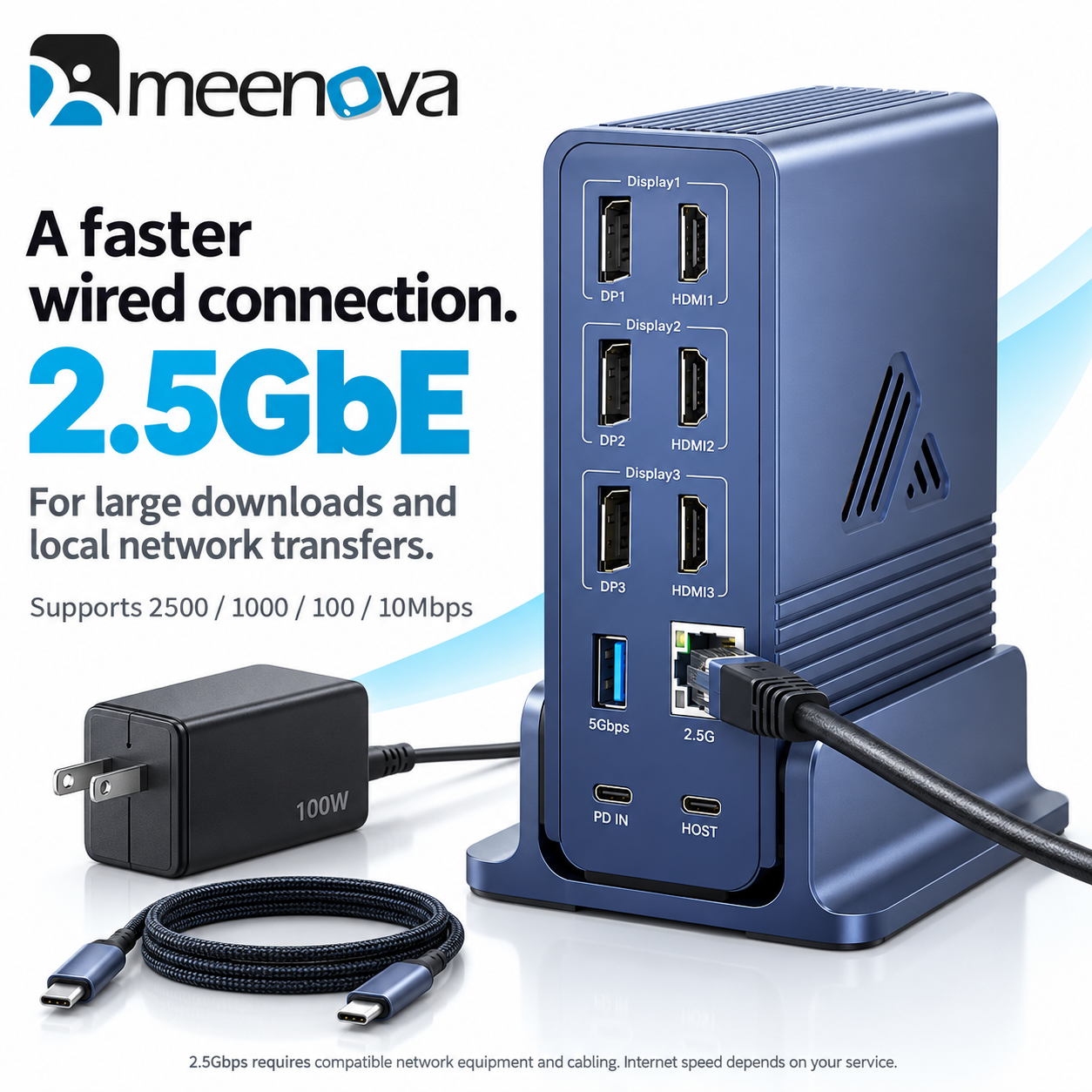
The 2.5GbE Ethernet port supports 2500/1000/100/10Mbps connections for compatible networks. A 3.5mm headset jack combines audio output and microphone input.
Power for your laptop and accessories
Use the included 100W US-plug PD adapter to power the dock. The host connection supports laptop charging up to 65W, and the front USB-C port marked PD 24W supports charging up to 24W alongside 10Gbps data transfer.
100W is the dock's maximum PD input rating, not its laptop charging output. Power is shared with the dock and connected devices; actual charging rates depend on the connected equipment and load.
Designed for your desk
An aluminum alloy housing and built-in cooling fan help dissipate heat. Use the dock upright in its removable stand or position it flat to suit your setup. A front power button and indicator keep everyday operation within reach.
All 18 connections
| Connection | Quantity & function |
|---|---|
| USB-C data | 3 front ports, up to 10Gbps; one also supports PD charging up to 24W |
| USB-A data | 3 ports: 2 front + 1 rear, up to 5Gbps |
| HDMI | 3 rear sockets; display pairing restrictions apply |
| DisplayPort | 3 rear sockets; display pairing restrictions apply |
| Memory card slots | 1 SD + 1 microSD (TF), SD/TF 3.0 |
| RJ45 Ethernet | 1 rear port, up to 2.5Gbps |
| 3.5mm audio | 1 front headset/microphone combo jack |
| USB-C host | 1 rear computer connection, up to 10Gbps data and up to 65W laptop charging |
| USB-C PD input | 1 rear power input, up to 100W (20V/5A) |
Specifications & included items
- Model: DS024, 18-port configuration
- Color and material: Slate blue aluminum alloy
- Dock dimensions: Approx. 142 × 85 × 36mm / 5.59 × 3.35 × 1.42in
- Stand dimensions: Approx. 85 × 75 × 40mm / 3.35 × 2.95 × 1.57in
- Power adapter: Included 100W USB-C PD adapter, US plug
- Cable: Included 0.7m / approx. 2.3ft braided USB-C to USB-C cable
- Stand: Included removable desktop stand
Before you connect
- Connect the included power adapter to the rear PD IN port.
- Install the appropriate DisplayLink software: Windows downloads or macOS downloads. Check the operating-system requirements on the download page.
- Connect your computer to the rear HOST port using the supplied cable. For full video functionality, use a compatible USB-C host port with DisplayPort video support. Compatible Thunderbolt 3/4 and USB4 host ports may also be used.
A USB-C connector alone does not confirm video compatibility. This is a USB-C DisplayLink dock, not a 40Gbps Thunderbolt dock. USB and Ethernet figures describe maximum link rates; actual transfers vary. A 2.5Gbps network connection requires compatible network equipment and cabling. Computers, displays, cards and other peripherals shown in product images are not included.
Highlights explained
Connections
18 physical ports
The 18 physical ports connection layout reduces the need for separate accessories. Each connection has its own role and limit; available bandwidth or charging power may be shared.
Interface bandwidth
10Gbps USB-C
The listed interface rate is up to 10Gbps USB-C. Actual file-copy speed depends on both devices, the cable, storage, software and file sizes; interface bandwidth is not a guaranteed transfer speed.
Wired network
2.5GbE
The 2.5GbE Ethernet connection links a compatible host to a wired network. Actual network throughput depends on the host, switch, cable and service, not just the port rating.
Display output
DisplayLink + host video
Display outputs require the documented host support and DisplayLink software. Display count and independent desktops differ between Windows and Mac; the six sockets are not six independent outputs.
Package selection
100W US-plug adapter
Check the 100W US-plug adapter package and selected option before purchase. Demonstration phones, drives, watches or other props are not included unless the package description expressly lists them.
Practical use
Building a multi-display desk with connected storage and network
Use the product for Building a multi-display desk with connected storage and network, with compatible equipment and the specified connection. Plan the space, power source and accessories needed for that task before ordering.