




MEENOVA · DS015
One dock. More room to work.
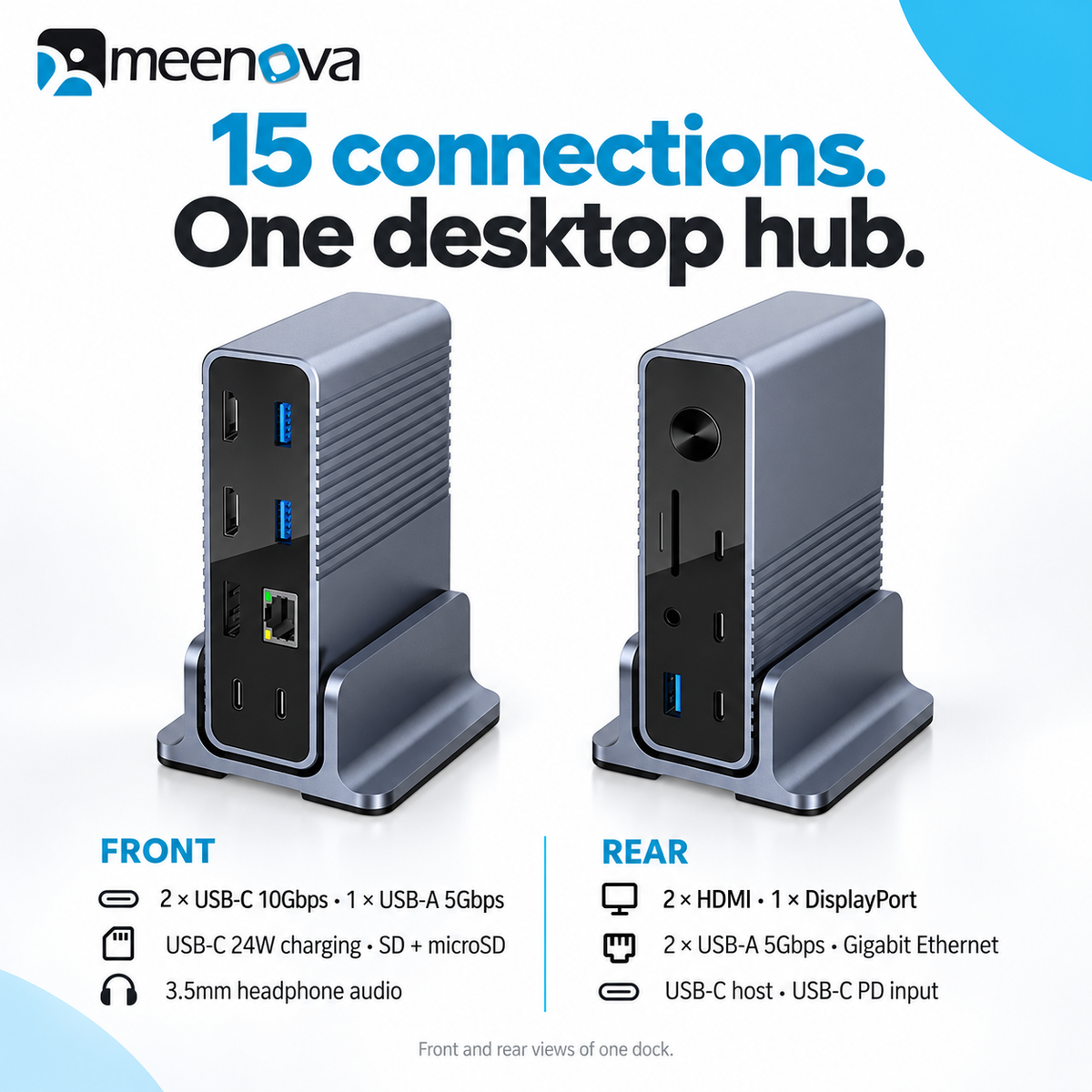
Build a more connected desktop with the Meenova 15-in-1 USB-C Docking Station. Bring together your displays, storage, wired network, memory cards and headphones in a compact aluminum dock that fits neatly beside your laptop.
Connections for your everyday workflow
- Flexible display connections: two HDMI outputs and one DisplayPort output support a range of desk setups, with up to three extended external displays on compatible Windows computers.
- Fast USB data: two USB-C data ports offer up to 10Gbps, while three USB-A ports offer up to 5Gbps for storage and peripherals.
- Wired networking: connect through the RJ45 Gigabit Ethernet port for network speeds up to 1000Mbps.
- Read both memory cards: SD and microSD slots support simultaneous reading, with a stated theoretical interface rate up to 104MB/s.
- Convenient audio: connect headphones or speakers through the front 3.5mm audio output.
- A flexible desktop fit: an aluminum alloy enclosure, removable cradle and power button support vertical or horizontal placement.
Choose your display setup
| Video output | Maximum per-port specification |
|---|---|
| HDMI 1 | HDMI 2.0 · Up to 4K at 60Hz |
| HDMI 2 | HDMI 1.4 · Up to 4K at 30Hz |
| DisplayPort | DisplayPort 1.2 · Up to 4K at 60Hz |
Windows: compatible hosts can extend to as many as three external displays. The laptop display may provide a fourth screen, subject to the computer's display limits.
macOS: external displays connected through this dock mirror one another. Your Mac's built-in screen can show a different workspace. This dock does not provide separate extended desktops across multiple external monitors on macOS.
The listed resolutions are individual port maximums, not a guarantee of simultaneous maximum output. Your computer, USB-C video support, cables, monitors and display combination determine available resolutions and refresh rates.
Power your setup
Up to 100W USB-C PD input supplies the dock through its rear PD IN port.
Up to 55W laptop charging is delivered through the host connection.
Up to 24W front USB-C charging supports compatible phones and tablets.
Power adapter not included. Supply a compatible 100W USB-C PD adapter for the stated charging performance. The 100W figure describes input power; laptop charging is limited to up to 55W.
Power is shared with the dock and connected devices. Actual charging depends on the adapter, cables and device requirements. The front 24W charging port requires the connected host to be in a normal powered/charging state.
All 15 ports at a glance
| Connection | Quantity and function |
|---|---|
| HDMI | 2 · Video output |
| DisplayPort | 1 · Video output |
| USB-A data | 3 · USB 3.0, up to 5Gbps (1 front, 2 rear) |
| USB-C data | 2 · Up to 10Gbps, front panel |
| USB-C charging | 1 · Front charging output, up to 24W |
| USB-C host | 1 · Rear connection to computer; up to 55W host charging |
| USB-C PD input | 1 · Rear power input, up to 100W |
| RJ45 Ethernet | 1 · Gigabit networking, up to 1000Mbps |
| SD and microSD / TF | 2 · One slot each, simultaneous reading supported |
| 3.5mm audio | 1 · Headphone / speaker output |
Product specifications
| Model | DS015 |
|---|---|
| Housing | Aluminum alloy |
| Dock dimensions | Approximately 120.7 × 83.8 × 36mm (4.75 × 3.30 × 1.42in) |
| Cradle dimensions | Approximately 83.5 × 75 × 40.8mm (3.29 × 2.95 × 1.61in) |
| Supplier-listed weight | 800g (1.76lb); net or packaged basis not specified |
| Power adapter | Not included; compatible 100W USB-C PD adapter required for stated charging performance |
Dimensions follow the supplier's written specification table. The accompanying illustration reverses the 83.5mm and 83.8mm measurements; dimensions are approximate and subject to confirmation.
Before you connect
- Use a compatible USB-C host that supports video output for external displays, and USB-C charging for laptop power delivery.
- USB and card-reader figures are maximum interface rates. Actual transfer speeds depend on the host, storage, cards and workload.
- USB-C ports have different functions. Use the labeled host, PD input, data and charging ports as intended.
- Laptops, monitors, storage devices, memory cards and headphones shown in lifestyle images are illustrative accessories.
Highlights explained
Connections
15-in-1 layout
The 15-in-1 layout connection layout reduces the need for separate accessories. Each connection has its own role and limit; available bandwidth or charging power may be shared.
Interface bandwidth
10Gbps USB-C
The listed interface rate is up to 10Gbps USB-C. Actual file-copy speed depends on both devices, the cable, storage, software and file sizes; interface bandwidth is not a guaranteed transfer speed.
Wired network
Gigabit Ethernet
The Gigabit Ethernet Ethernet connection links a compatible host to a wired network. Actual network throughput depends on the host, switch, cable and service, not just the port rating.
Memory-card access
SD + microSD
The SD + microSD card connection provides access to compatible removable media. Check the supported card format, host software and whether simultaneous slot access is available on this version.
Display output
Dual HDMI + DisplayPort
The connectors have different maximum specifications. Supported Windows hosts can extend separate displays; Mac external screens on this dock mirror one another.
Practical use
Bringing displays and everyday desk peripherals together
Use the product for Bringing displays and everyday desk peripherals together, with compatible equipment and the specified connection. Plan the space, power source and accessories needed for that task before ordering.