


K811 19-Key Mechanical
Macro Keypad
A compact wired control pad with 19 programmable mechanical keys, a rotary volume knob, five-way joystick, scroll wheel, media controls, full-key hot swapping and customizable RGB lighting for work, gaming and creative applications.
A DEDICATED COMMAND CENTER FOR YOUR DESK
More Keys, More Controls,
Less Repetitive Work
Assign frequently used commands, shortcuts, media functions and supported macro sequences to a compact secondary keypad. The K811 combines a 19-key mechanical layout with multiple dedicated controls, giving you faster access without overloading your primary keyboard.
19 Programmable Keys
Configure 19 mechanical keys for standard keyboard inputs, application shortcuts, multimedia actions, mouse functions and supported macro sequences.
Full-Key Hot Swapping
Replace compatible mechanical switches without soldering. Customize switch feel, sound and keycap colors according to your preferred setup.
Full-Key Anti-Ghosting
Register multiple simultaneous keypresses without unwanted conflicts, helping maintain accurate input during gaming and complex shortcut combinations.
10 RGB Lighting Modes
Choose from ten colorful backlight modes to improve key visibility and coordinate the keypad with your gaming or workstation setup.
MORE THAN A MECHANICAL KEYPAD
Knob, Joystick, Scroll Wheel
and Media Controls
Dedicated controls provide faster volume adjustment, directional movement, page scrolling, playback control and profile switching.
Fast Volume Adjustment
Rotate left to reduce volume and rotate right to increase volume using the knob's default function.
Previous, Next and Play/Pause
Dedicated buttons below the large knob provide convenient media playback control.
Directional and Mode Control
Move up, down, left or right for directional control. Press the joystick down to switch between supported modes.
Page and Document Scrolling
The right-side wheel functions as a mouse scroll wheel by default for moving through pages, documents and menus.
CUSTOM DRIVER SOFTWARE
Configure Keys, Macros,
Lighting and Controls
The K811 configuration software includes device settings, key assignments, macro management, lighting controls and multiple configuration profiles. Available functions depend on the selected control and software mode.
Supported Assignment Types
IMPORTANT FUNCTION DIFFERENCES
Onboard and Software-Dependent Functions
Some assignments can be stored for use after configuration, while other advanced computer actions require the driver program to remain open.
Saved Device Functions
- Default key functions
- Keyboard assignments
- Macro definitions
- Mouse functions
- Multimedia functions
Computer-Dependent Functions
- Windows shortcuts
- Open an application
- Open a website
- Send text
- Disable-key commands
Detachable USB-C Wired Connection
The key-and-cable separation design makes the cable easier to replace, organize and store while providing continuous wired power and data.
Detachable Interface
Stable Power and Data
Connected Device at a Time
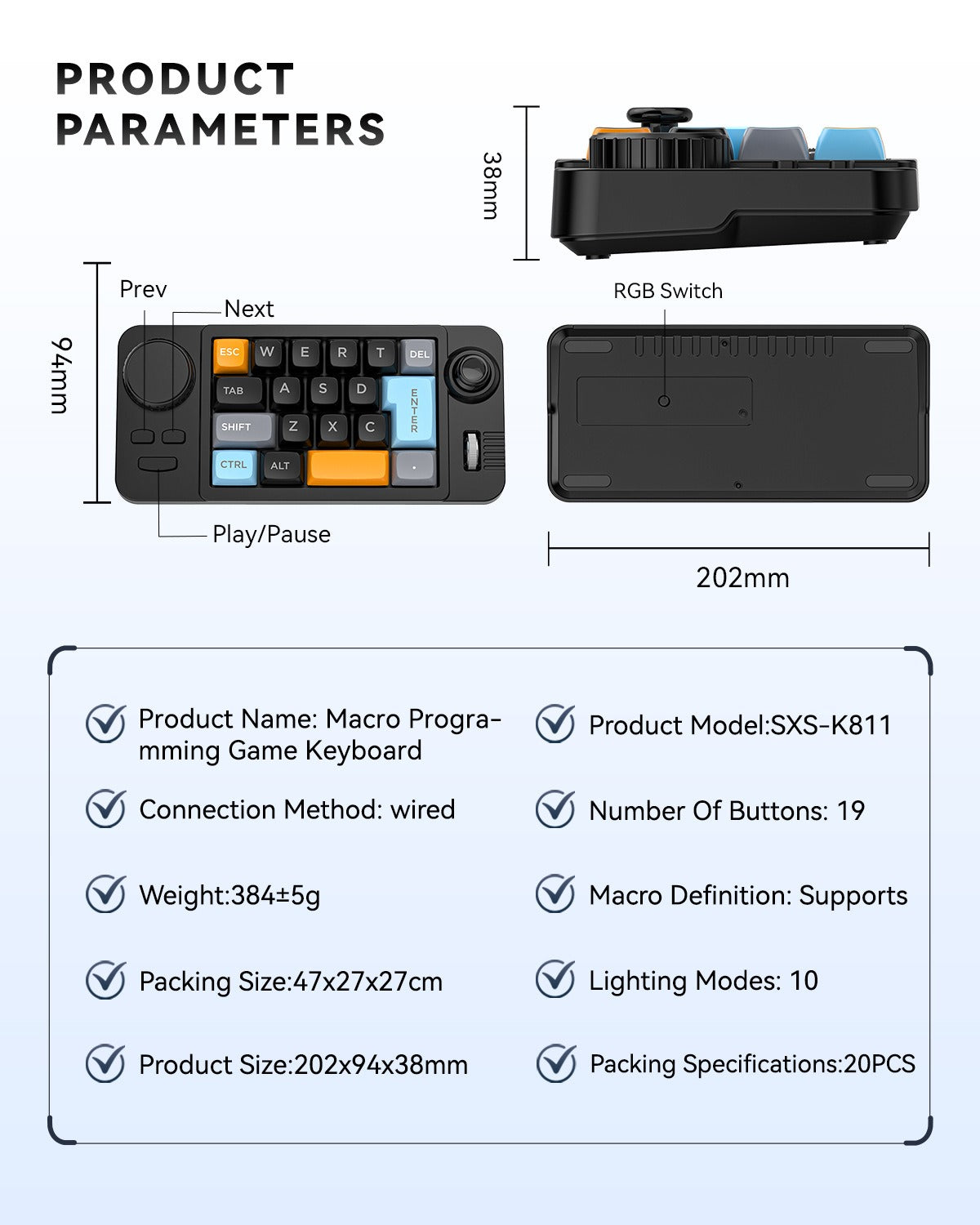
Compact Desktop Footprint
The K811 adds dedicated controls without requiring the space of a full-size second keyboard.
Width / 7.95 in
Height / 3.70 in
Depth / 1.50 in
Listed Weight Including Retail Box
THREE COLOR OPTIONS
Choose the Style That Fits Your Setup
One Keypad, Multiple Workflows
Use the K811 wherever your main keyboard does not provide enough convenient dedicated controls.
Gaming
Assign repeated commands, key combinations and directional controls.
Office Work
Speed up shortcuts, repeated input and application commands.
Creative Software
Create dedicated controls for editing, design and production tools.
Media and Streaming
Control playback, volume, scrolling and communication functions.
TECHNICAL DETAILS
Product Specifications
Typical Package Contents
Spare switches, switch pullers, keycap pullers, manuals and other accessories may vary by selected variant or production batch. Confirm the exact package contents shown for your selected option.
Important Notes
- The product contains 19 programmable mechanical keys. The rotary knob, media buttons, joystick and scroll wheel are additional controls and are not included in the 19-key count.
- The page parameter image lists 10 lighting modes. This figure refers to RGB lighting effects, not the number of key profiles.
- The listed 384 ± 5g weight includes the retail box and should not be interpreted as the confirmed net product weight.
- Advanced macro, lighting and control assignments require the compatible K811 configuration software.
- Some assignments can be stored on the device, while certain Windows shortcuts, application, website and text functions require the driver program to remain open.
- The large left knob and right-side scroll wheel have more limited assignment options than the main mechanical keys.
- The original product title mentions red switches, but the page images emphasize hot-swappable switches and do not confirm that every color variant includes the same switch type.
- Only install switches that are physically and electrically compatible with the hot-swap sockets.
- Keycap colors, switch colors, lighting appearance and included accessories may vary slightly between variants and production batches.
Highlights explained
Keyboard layout
19-key layout
The 19-key layout layout provides physical input for typing or repeated commands. Check the exact layout and selected version; key functions and shortcuts may differ by operating system.
Switch customization
Hot-swappable
The Hot-swappable switch design allows compatible switches to be replaced as specified. Match the switch format and disconnect the keypad before carrying out adjustments.
Programmable controls
Onboard programmable controls
The Onboard programmable controls controls can support shortcuts and repeated commands through compatible configuration software. Software availability, operating-system support and application behavior affect the functions you can assign.
Additional controls
Knob, joystick and scroll wheel
The Knob, joystick and scroll wheel controls add physical navigation or adjustment options. Check the selected version and its software support rather than assuming identical behavior in every application.
Lighting options
10 lighting modes
The listed 10 lighting modes lighting options let you adjust the appearance for the workspace. Supported colors and modes depend on the selected model; lighting also affects battery use where applicable.
Practical use
Adding dedicated commands to a creative or office setup
Use the product for Adding dedicated commands to a creative or office setup, with compatible equipment and the specified connection. Plan the space, power source and accessories needed for that task before ordering.