


Expand Your Laptop Into a Complete Workstation
A powerful USB-C docking station combining triple display support, 100W Power Delivery, Gigabit Ethernet, USB expansion, card readers, and audio connectivity in one compact desktop hub.
Multiport Expansion
PD Pass-Through
Display Outputs
Ethernet Network
One Dock for Work, Creativity, and Connectivity
Turn a single USB-C port into a complete workstation connection. Connect multiple displays, external storage, network cables, accessories, and power through one compact docking station.
Triple Display Expansion with MST Support
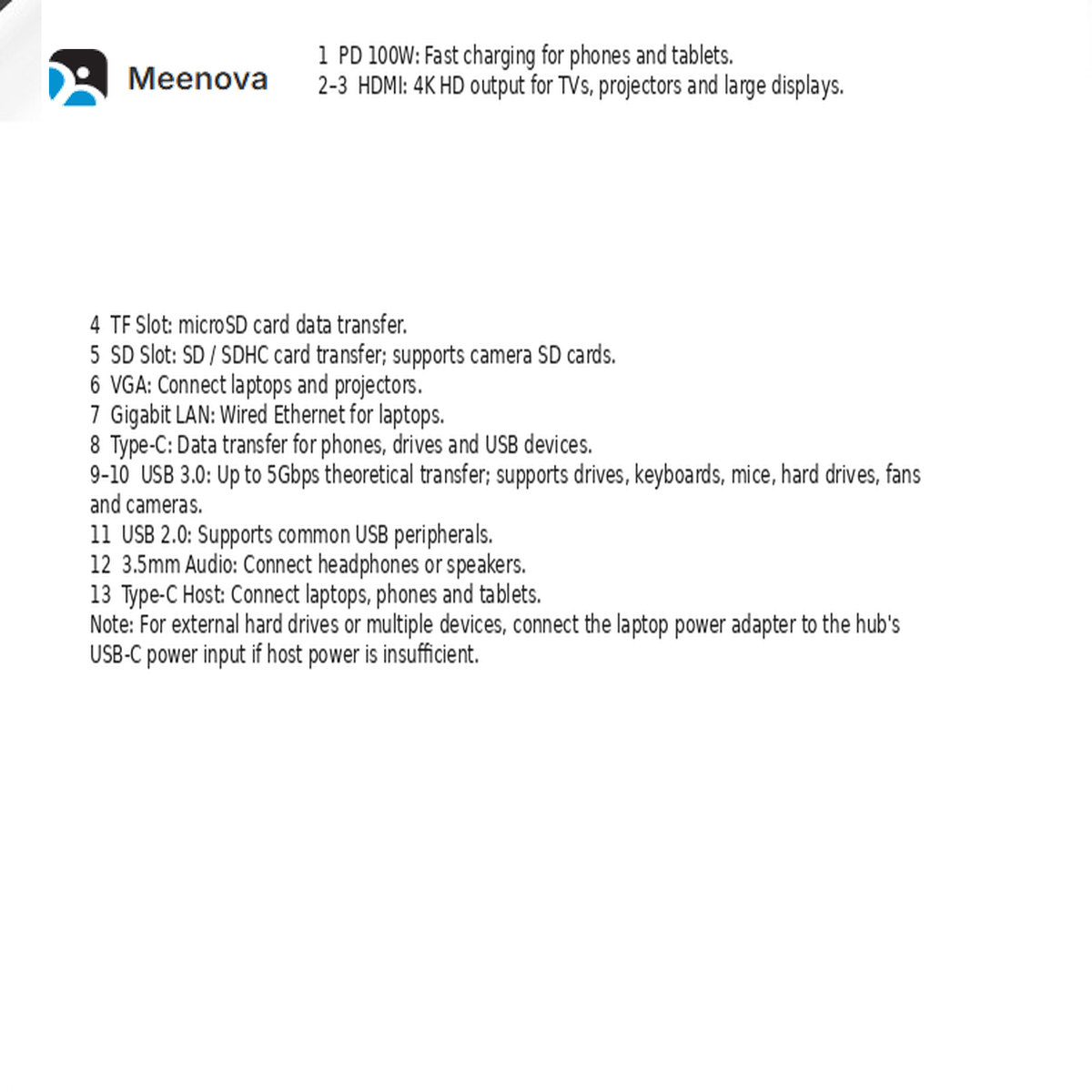
HDMI ×2
Connect multiple HDMI monitors for expanded workspace.
VGA ×1
Supports VGA displays and projectors.
MST Support
Expand your desktop across multiple screens on supported systems.
100W Power Delivery Pass-Through
Supports up to 100W USB-C PD pass-through charging when connected with a compatible charger. Actual charging speed depends on the charger, cable, laptop requirements, and connected devices.
Complete Connectivity in One Hub
USB Expansion
USB 3.0 and USB 2.0 ports for accessories, storage, and peripherals.
Card Readers
SD and TF slots for photos, videos, and file transfer.
Ethernet
Gigabit Ethernet for stable wired network connections.
Audio
3.5mm audio connection for headphones and speakers.
Designed for Professional Workflows
Office Work
Multiple monitors, keyboard, mouse, network, and accessories.
Content Creation
Transfer files from SD cards and connect creative equipment.
Remote Work
Build a complete workstation from a laptop.
Wide Device Compatibility
Windows Laptop
Compatible USB-C computers.
MacBook
USB-C Mac computers with supported display features.
USB-C Tablets
Compatible OTG devices.
Specifications
Important Notes
- Triple display support depends on the laptop operating system, graphics capability, and USB-C port specifications.
- 100W PD refers to maximum pass-through input, not guaranteed laptop charging speed.
- Some Mac systems may have display limitations depending on macOS and chipset.
- Actual resolution and refresh rate depend on connected monitors and devices.
- A compatible USB-C power charger is required for PD charging.
Highlights explained
Connections
12-in-1 selected version
The 12in1 option combines display, USB, network, card-reader, audio and PD connections. This port list does not describe the separate 5in1 option.
Display output
2 HDMI + VGA
The 12in1 version lists two HDMI outputs and one VGA output. Multiple independent displays require a compatible video-capable host and supported operating system; connector count alone does not establish display modes.
PD power input
Up to 100W input
The 12in1 version advertises up to 100W USB-C PD pass-through with compatible equipment. Host charging power depends on the adapter, cable, laptop and hub consumption.
Wired network
Gigabit Ethernet
The Gigabit Ethernet Ethernet connection links a compatible host to a wired network. Actual network throughput depends on the host, switch, cable and service, not just the port rating.
Memory-card access
SD / TF
The SD / TF card connection provides access to compatible removable media. Check the supported card format, host software and whether simultaneous slot access is available on this version.
Practical use
Connecting displays and accessories for a laptop workspace
Use the 12in1 version with a compatible USB-C video-capable laptop, suitable display cables and supported peripherals. Confirm the intended monitor layout for the exact computer before ordering.
Connections
12-in-1 selected version
The 12in1 option combines display, USB, network, card-reader, audio and PD connections. This port list does not describe the separate 5in1 option.
Display output
2 HDMI + VGA
The 12in1 version lists two HDMI outputs and one VGA output. Multiple independent displays require a compatible video-capable host and supported operating system; connector count alone does not establish display modes.
PD power input
Up to 100W input
The 12in1 version advertises up to 100W USB-C PD pass-through with compatible equipment. Host charging power depends on the adapter, cable, laptop and hub consumption.
Wired network
Gigabit Ethernet
The Gigabit Ethernet Ethernet connection links a compatible host to a wired network. Actual network throughput depends on the host, switch, cable and service, not just the port rating.
Memory-card access
SD / TF
The SD / TF card connection provides access to compatible removable media. Check the supported card format, host software and whether simultaneous slot access is available on this version.
Practical use
Connecting displays and accessories for a laptop workspace
Use the 12in1 version with a compatible USB-C video-capable laptop, suitable display cables and supported peripherals. Confirm the intended monitor layout for the exact computer before ordering.
Connections
5-in-1 selected option
This is the separate 5in1 option. The current description focuses on the 12in1 model; its full port list and performance ratings must not be applied to this selection.
Connector layout
Confirm the host connection
Check the selected 5in1 model's plug, downstream ports and required host functions with Meenova before ordering.
Practical use
Planning a compact laptop accessory setup
Confirm that the chosen 5in1 version provides each connection required for your laptop, monitors and accessories before purchase.
Before ordering
Confirm video and charging support
The 5in1 option's exact video, network, card-reader and charging capabilities are not established by the current 12in1 description. Ask for model-specific specifications.
Package selection
Selected 5-in-1 version
Confirm which cables and accessories are included with the selected 5in1 version. Do not assume the 12in1 package contents apply.