

Meenova
PD 100W Type‑C to MagSafe 3 Magnetic Fast Charging Adapter Compatible with MacBook Air / Pro M1 M2 M3 M4 M5
PD 100W Type‑C to MagSafe 3 Magnetic Fast Charging Adapter Compatible with MacBook Air / Pro M1 M2 M3 M4 M5
Couldn't load pickup availability
Turn a USB-C PD Charger into a Compact MagSafe 3 Charging Setup
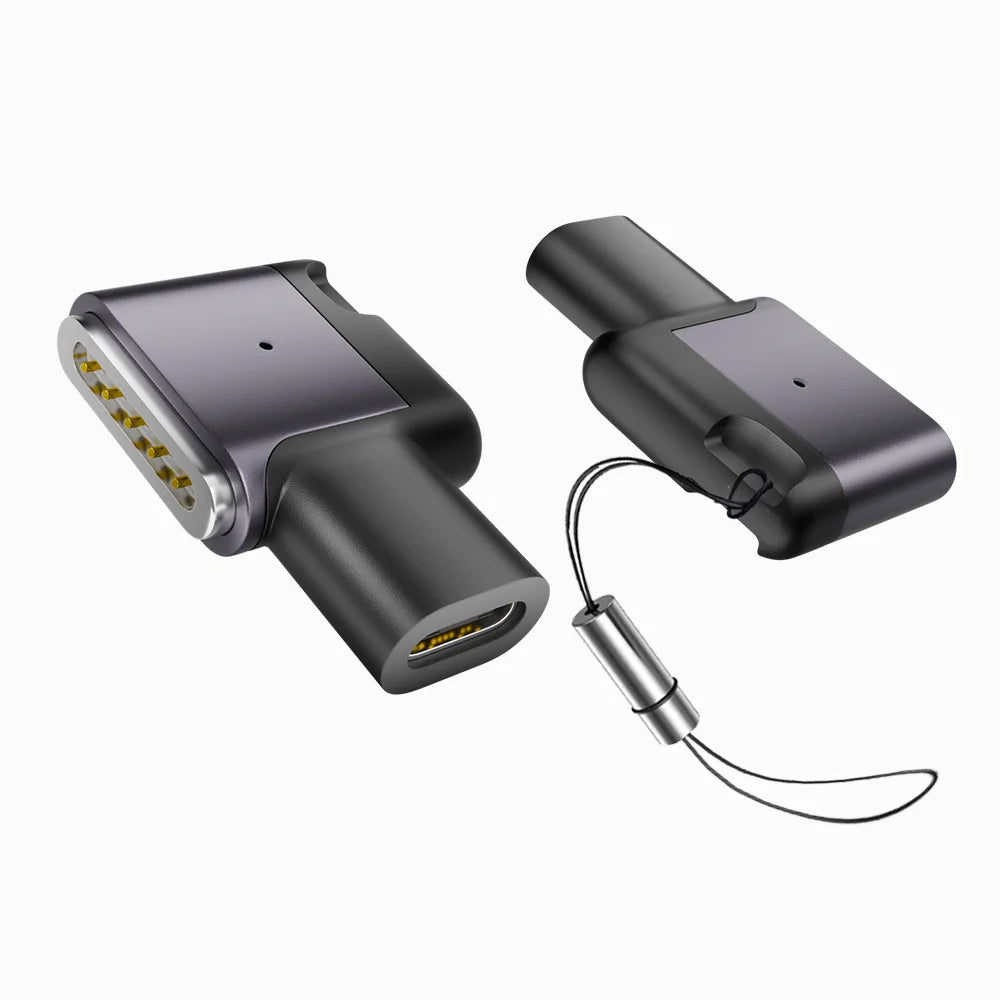
A right-angle charging converter designed for MacBook models equipped with a MagSafe 3 port. Connect a compatible USB-C PD charger and USB-C cable, then enjoy magnetic attachment, charging-status indication, and up to 100W power delivery in a compact adapter.
Add MagSafe 3 Convenience Without Carrying a Separate Charging Cable
The adapter connects a USB-C PD power source to the MagSafe 3 port on a compatible MacBook. It is useful as a compact replacement, backup, travel accessory, or desk adapter when you already own a suitable USB-C charger and cable.
Up to 100W Power Pass-Through
Supports up to 20V/5A when used with a compatible 100W USB-C PD charger, a USB-C cable rated for 5A/100W, and a MacBook capable of accepting the available power.
Quick MagSafe 3 Attachment
The magnetic connector aligns with a compatible MacBook charging port for easy attachment and removal without inserting a USB-C plug into the laptop.
Routes the Cable Along the Side
The side-bend structure keeps the USB-C cable closer to the edge of the MacBook instead of extending straight outward from the MagSafe 3 port.
Compact Metallic Outer Housing
The product image identifies an aluminum-alloy outer shell designed to provide a clean metallic finish and added resistance to everyday oxidation and corrosion.
The Adapter Does Not Increase the Charger’s Wattage
The final charging power is limited by the lowest-rated component in the setup: the USB-C power adapter, USB-C cable, this converter, and the MacBook itself.
Check Charging Status from the Adapter
Check the Charging Port, Not Only the Apple Chip
This adapter is compatible only with MacBook models that physically include a MagSafe 3 charging port.
A chip name alone does not confirm compatibility. For example, some M1 and M2 MacBooks use USB-C charging only and do not include MagSafe 3.
Maximum 100W Output Is Below Apple’s 140W Fast-Charge Setup
The adapter can charge a compatible 16-inch MacBook Pro, but its 100W maximum cannot reproduce the full 140W MagSafe 3 charging configuration Apple specifies for 16-inch models. Charging may therefore be slower, especially during demanding workloads.
Connect Your Existing USB-C PD Equipment
Specifications
What Is Included
Important Notes
- Compatibility depends on the MacBook having a physical MagSafe 3 port. Chip generation alone does not confirm compatibility.
- MacBook Air M1 (2020), 13-inch MacBook Pro M1 or M2, and older MagSafe 1 or MagSafe 2 MacBooks are not compatible.
- Up to 100W requires a suitable 100W USB-C PD charger and a USB-C cable rated for 5A/100W. Lower-rated chargers or cables reduce the available output.
- The adapter’s 100W maximum is below the 140W charging configuration Apple recommends for full fast charging on compatible 16-inch MacBook Pro models.
- Actual charging power varies with the MacBook model, battery level, workload, temperature, power adapter, cable, and macOS power management.
- This is a charging adapter only. It does not transfer video, audio, files, or Thunderbolt data.
- This third-party adapter is not represented as an Apple-manufactured accessory.
Share